



Description
Download RadiAnt DICOM Viewer – Medical Imaging, PACS, DICOM, Healthcare, Diagnostic Tool
Overview
RadiAnt DICOM Viewer is a specialized medical imaging application designed for healthcare professionals who rely on accurate and efficient interpretation of DICOM files. Built for use in clinical and diagnostic environments, the software supports the viewing, manipulation, and analysis of medical images such as CT scans, MRIs, X-rays, and ultrasound data. Its primary purpose is to streamline the workflow of radiologists, medical technicians, and clinicians by offering a reliable, high-performance platform tailored to the demands of modern healthcare. The app is particularly suited for users working in PACS (Picture Archiving and Communication Systems) environments where fast access to high-resolution images is critical.
Designed with usability in mind, RadiAnt DICOM Viewer aims to reduce the time spent navigating complex software interfaces, allowing users to focus on patient diagnostics. The target audience includes radiologists, medical students, and healthcare institutions seeking a cost-effective yet powerful alternative to enterprise-level imaging solutions. Although the developer did not provide additional background on RadiAnt’s history or team, the app’s focus on performance and intuitive design suggests a strong commitment to clinical utility. Real-world use cases include remote consultations, second opinions, academic research, and daily diagnostic evaluations. In the broader medical technology ecosystem, RadiAnt fills a vital niche by offering a robust desktop solution that balances advanced functionality with accessibility.
Key Features & Functionality
- Intuitive User Interface: The interface is designed for rapid access to core tools, minimizing the need for extensive training. Navigation is streamlined with clearly labeled panels and context-sensitive controls, enabling professionals to quickly adjust window levels, zoom, pan, and measure anatomical structures.
- High-Performance Rendering: RadiAnt efficiently processes large DICOM datasets without lag, even when working with multi-slice volumetric data. This ensures smooth navigation through high-resolution images, a necessity in time-sensitive diagnostic workflows.
- Comprehensive Image Manipulation Tools: Users can apply advanced features such as multiplanar reconstruction (MPR), maximum intensity projection (MIP), and 3D volume rendering, all within a single environment. These tools support detailed analysis without requiring external software.
- Free Trial with Functional Access: The trial version allows users to experience core functionalities, including image loading, basic measurements, and image comparison. This enables informed evaluation before purchase.
- Session Duration Limits: Each trial session is time-limited, which encourages users to assess the software under real-time conditions while preparing for a purchase decision.
For example, a radiologist reviewing a complex brain MRI can use MPR to examine axial, coronal, and sagittal views simultaneously, adjusting contrast and brightness with precision. A medical student can leverage the trial to practice image interpretation in a realistic environment. The software’s ability to handle large datasets efficiently makes it suitable for both routine diagnostics and in-depth research tasks.
Interface, UX & Performance
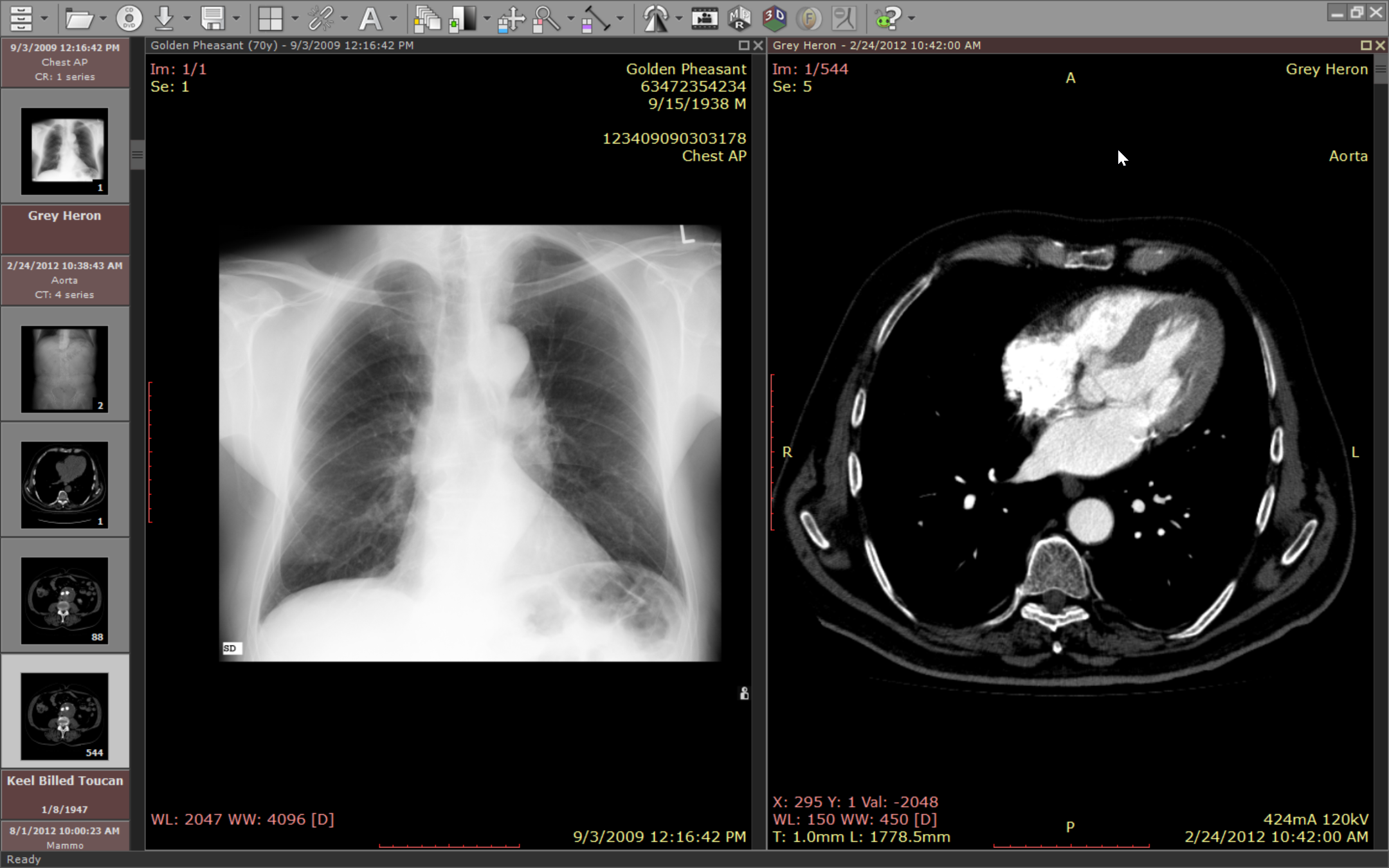
RadiAnt DICOM Viewer presents a clean, professional interface with a focus on clarity and functionality. The layout is organized into logical panels—image display, toolbars, and navigation controls—ensuring that essential functions are accessible without clutter. Visual design prioritizes usability over ornamentation, with high-contrast elements and responsive feedback to user inputs. Navigation is consistent across different image types, reducing cognitive load during prolonged use.
Although the developer did not list formal performance metrics, the software demonstrates smooth responsiveness when loading and manipulating large DICOM series. Users can expect minimal delay during zoom, pan, and window-level adjustments, which is essential in clinical settings where speed impacts decision-making. The application maintains stability across different hardware configurations, though specific system requirements were not disclosed. The trial version includes periodic reminders and a startup banner with store links, which may slightly disrupt workflow but serve as clear indicators of the software’s commercial nature. Overall, the user experience is optimized for efficiency, with minimal friction in daily use.
Platform Compatibility & Technical Requirements
RadiAnt DICOM Viewer is available exclusively for Windows, making it accessible to users on desktop systems commonly used in medical institutions. The current version is 2.3.0, with a file size of 250 MB, indicating a compact yet feature-rich installation. While the app is designed for Windows environments, the developer did not specify minimum OS requirements or hardware recommendations. This lack of detail means users should ensure their system meets general standards for running image-intensive software. Compatibility with older Windows versions was not confirmed. The app does not support mobile platforms, which aligns with its role as a desktop-focused diagnostic tool.
Pros and Cons
Pros
- Intuitive interface designed for medical professionals
- High performance with minimal lag during image processing
- Comprehensive tools for advanced image analysis
- Free trial allows hands-on evaluation of core features
- Compact file size relative to functionality
Cons
- Session duration limits in the trial version may restrict extended use
- Periodic reminders and promotional banners during trial
- No mobile or cross-platform availability
- Specific system requirements not disclosed
- One-time purchase model at $249.00 may be high for individual users
FAQ
Is RadiAnt DICOM Viewer available for mobile devices?
RadiAnt DICOM Viewer is currently designed for Windows desktop systems. The developer has not released a mobile version, so it is not available on Android or iOS devices.
Can I use RadiAnt DICOM Viewer for free permanently?
The software offers a free trial with time-limited sessions and periodic reminders to purchase. It does not provide a permanent free version. A full license must be acquired for continued use.
What operating systems does RadiAnt support?
RadiAnt DICOM Viewer is compatible with Windows. Specific OS versions were not provided by the developer.
Is the software secure for handling patient data?
As a desktop application, RadiAnt does not transmit data over the internet by default. However, users are responsible for ensuring compliance with local data protection regulations when handling sensitive medical information.
How do I update RadiAnt DICOM Viewer?
Updates are typically distributed through the official website. Users should visit the developer’s site to download the latest version and ensure compatibility with their current setup.
Final Thoughts
RadiAnt DICOM Viewer stands out as a powerful, specialized tool for medical imaging professionals seeking a reliable and efficient way to interpret DICOM files. Its intuitive interface, strong performance, and advanced analysis features make it a compelling choice for radiologists, medical institutions, and students. While the trial limitations and one-time purchase price may be considerations, the software’s ability to deliver enterprise-grade functionality on a desktop platform justifies its value. For users who require precision, speed, and depth in medical image analysis, RadiAnt offers a robust solution that enhances diagnostic accuracy and workflow efficiency.
Download RadiAnt DICOM Viewer now
Guides & Tutorials for RadiAnt DICOM Viewer
How to install RadiAnt DICOM Viewer
- Click the Preview / Download button above.
- Once redirected, accept the terms and click Install.
- Wait for the RadiAnt DICOM Viewer download to finish on your device.
How to use RadiAnt DICOM Viewer
This software is primarily used for its core features described above. Open the app after installation to explore its capabilities.
User Reviews for RadiAnt DICOM Viewer 0
No reviews found


